


Have you ever bought a product on “Sale” only to see its price drop even lower two days later?
It happens to millions of Indian shoppers. One of the biggest secrets in e-commerce is Dynamic Pricing. Sellers often quietly raise the MRP of a product just days before a big sale (like Big Billion Days) to make a standard price look like a “50% Off” loot deal.
If you aren’t checking the Flipkart price history, you are essentially shopping blind.
In this guide, we’ll show you exactly how to spot these fake drops and how to use the Flipkart Price History Tracker.
Why You Must Check Price History Before Buying
Before we get into the “How,” you need to understand the “Why.” Flipkart prices are not fixed. They fluctuate based on demand, time of day, and stock levels.
The “Yo-Yo” Pricing Trap
Here is a common pattern we see with electronics:
-
The Hike: A Samsung phone usually sells for ₹20,000. Three days before a sale, the price quietly goes up to ₹25,000.
-
The Drop: On sale day, it drops back to ₹21,000 with a “Huge Discount” tag.
-
The Scam: You think you saved money, but you actually paid ₹1,000 extra compared to the usual price.
How do you beat this? You need X-ray vision. You need to see the hidden price graph.
Method 1: How to Check Price History on PC (The Easiest Way)
Since Flipkart does not show historical pricing data on their website, you need a smart shopping assistant. The best way to see the truth is by using the Flipshope Chrome Extension.
It adds a simple “Price Graph” button directly inside the Flipkart product page, so you don’t have to switch tabs.
Step-by-Step Guide:
-
Install the Tool: Add the Flipshope Extension to your Chrome, Edge, or Brave browser. It’s free and safe.
-
Browse Flipkart: Open any product page (e.g., iPhone 15, Nike Shoes, etc.).
-
Look for the Graph: You will see a floating “Price Graph” button on the right side of the screen.
-
Analyze: Click the button to reveal the full history chart.

💡 Quick Check: Don’t want to install an extension yet? You can audit any product instantly on our dedicated Flipkart Price Tracker Tool page.
Method 2: How to Check Price History on Android (The Integrated App Method)
The process on Android is even simpler than on desktop! You do not need to copy and paste links. Your Flipshope App integrates directly with the Flipkart App via the Share menu, providing the ultimate seamless shopping experience.
Step-by-Step Guide for Android Users:
Step 1: Open Your Flipkart App Ensure both the Flipkart App and the Flipshope App are installed on your Android mobile.
Step 2: Find the Product and Share Go to the product page you want to audit (e.g., a new TV or washing machine). Tap the standard Share Icon (usually at the top right corner).
Step 3: Tap the Flipshope Icon In the list of sharing options that pops up, tap the Flipshope Icon.
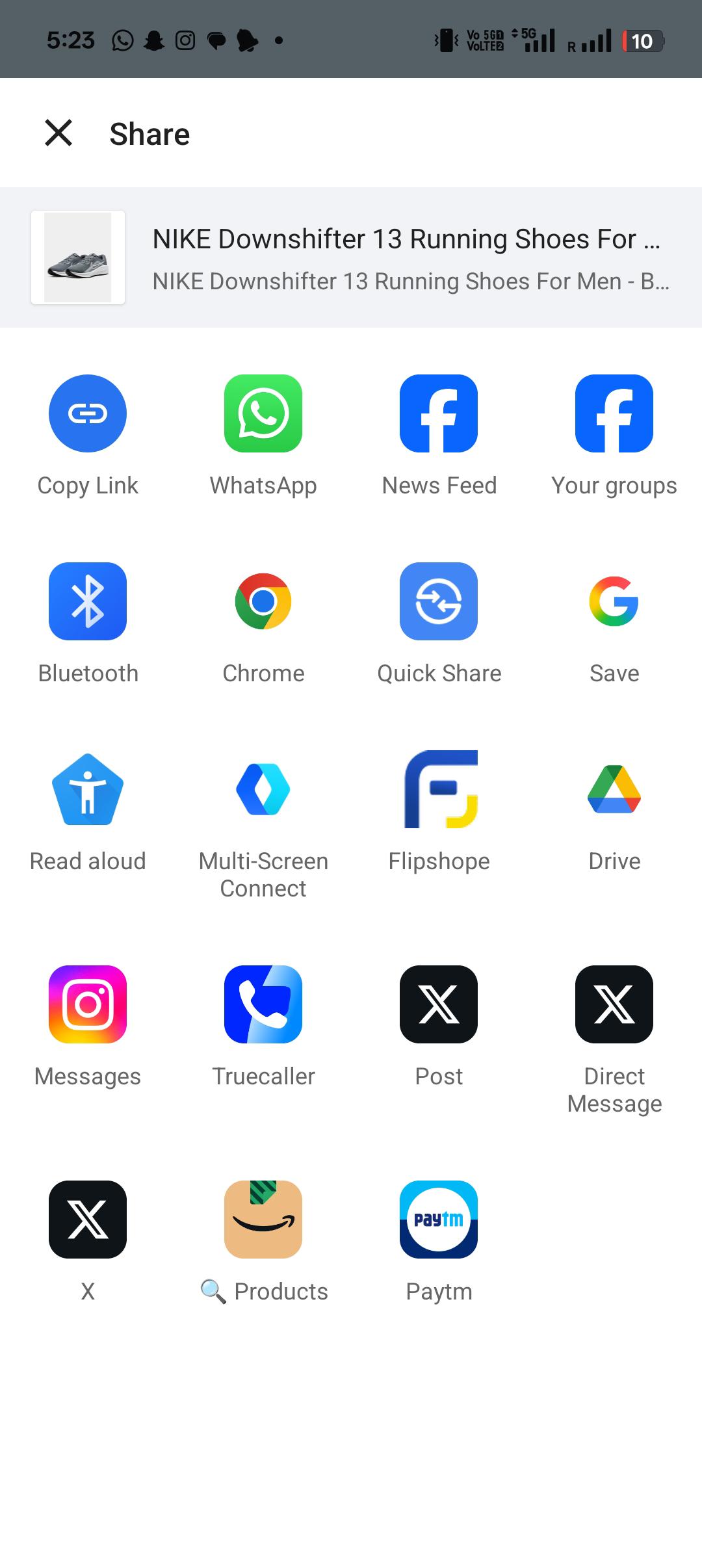
Step 4: View the Instant Graph The Price History Graph will instantly appear on your screen, overlaying the Flipkart app. This gives you the real deal score without having to leave the app!
Setting a Price Drop Alert on Android
If the graph shows the current price is too high, you can set an alert directly from this shared view:
-
Tap “Set Alert”: Click the SET Alert button visible on the instant graph screen.
-
Go to Shoplist: The product is now added to your watch list. You must navigate to your Flipshope App’s Shoplist Page.
-
Set Your Desired Price: Find the product in your Shoplist and manually enter the lowest price you are willing to pay.
The Flipshope App will now monitor that product 24/7 and notify you the moment the price hits your target!
📉 How to Read the Graph Like a Pro (Expert Tips)
Seeing the graph is one thing; understanding it is another. Here is how to interpret the lines to make smart decisions:
-
The Green Line (Lowest Price): This is your target. If the current price is near this line, it’s a great time to buy.
-
The Red Line (Highest Price): If the current price is touching the top red line, STOP. The product is overpriced. Wait for a drop.
-
The Dotted Line (Average Price): This is the standard market rate. Never pay more than this amount.
Real Example: If you see a sudden vertical spike in the graph just days before a sale, that is a Fake Price Hike. Avoid that product until the line flattens out again.
🔔 What If the Price is High Right Now?
If the graph shows the product is expensive today, don’t just close the tab. Set a Trap.
Using the Flipshope tool, you can set a Price Drop Alert:
-
Click the “Set Alert” bell icon.
-
Enter your target price (e.g., “Notify me when it drops below ₹15,000”).
-
We will monitor the price 24/7 and notify you via browser or WhatsApp the second the deal goes live.
Frequently Asked Questions (FAQs)
Q: Can I check price history natively on the Flipkart app?
A: No, Flipkart does not provide a price history feature on their app or website. You must use a third-party tool like Flipshope to view this data.
Q: Is the price history data accurate?
A: Yes. Flipshope tracks millions of products daily. However, prices can change in seconds during Flash Sales, so we recommend checking the Flipkart Price Tracker for real-time verification.
Q: Does this work for Big Billion Days?
A: Absolutely. This is the most critical time to use it. The tracker helps you distinguish between a “Real Loot Deal” and a “Marketing Gimmick.”
Conclusion: Stop Guessing, Start Tracking
Shopping without checking the history is like gambling with your hard-earned money. Don’t let dynamic pricing trick you.
Ready to shop smarter? Check the real price history of your wishlist items now on our main Flipkart Price Tracker page or install the extension below.